 CXRoster
A familiar place
for every flight.
Keep a calendar for yourself and a calendar to share. Both is the default; either can also be used on its own.
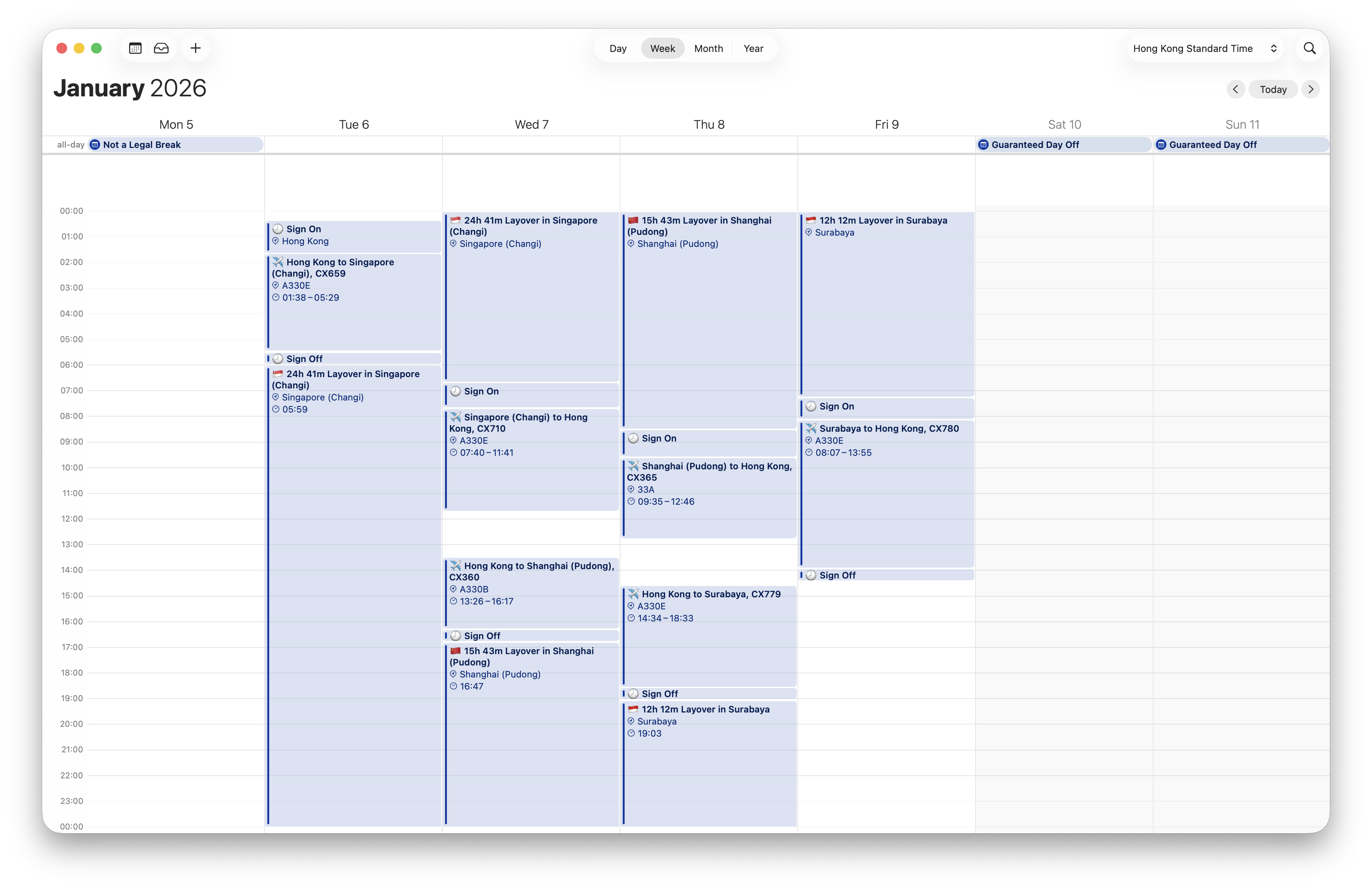
Made for your Cathay roster.
Make time for life together.
Your roster in Apple Calendar.
A little easier to plan around.
In beta for iPhone. Not yet available on the App Store.
A little less admin.
From codes to clarity.
Give your roster room to breathe. See flights, sign-on, sign-off and layovers as individual calendar events.
With CXRoster: individual flights, sign-on, sign-off and layovers, laid out in Apple Calendar.
Keep a calendar for yourself and a calendar to share. Both is the default; either can also be used on its own.
Use a Sharing Calendar for partners, family and friends. Timed events display in the viewer’s calendar time zone. Use either calendar on its own, or both.
Export flight details to LogTen with UTC times. Review the entries in your logbook and keep moving.
Ready when you are.
Choose Flight Crew or Cabin Crew, set up your calendars and review your choices. Both is the default: a calendar for you and another to share. Finish setup first, then bring in your roster using the separate import guide.
CXRoster is currently in beta and is not yet publicly available on the App Store. Existing testers can use TestFlight. For beta enquiries, contact support.
Choose Flight Crew or Cabin Crew, then Both (the default), Only for Myself or Only to share. Allow full calendar access, then create or choose an iCloud calendar for each purpose.
On Your setup, check your choices and use Edit to backtrack. Finish setup opens the app. Import instructions are separate, under How to import and in Settings.
No. You export your roster from your Cathay app, then import that export into CXRoster. CXRoster does not sign you into Cathay or need your Cathay password.
Choose a Sharing Calendar for family and friends, a Local Time Calendar for yourself, or both. Timed sharing events display in the viewer’s calendar time zone. All-day events remain all-day dates.
Set up sharing once per recipient, then keep importing into the same calendar. You can hide it from your own Apple Calendar view while continuing to share it. After roster changes, refresh, export and import again.
Follow the one-time sharing guide ›. Onboarding uses iCloud calendars. Crew Connect cabin support remains unverified.
Yes. Choose a dedicated roster calendar during setup. You can view it alongside your other calendars in Apple Calendar.
CXRoster sends flight details to the separately installed LogTen app. Review your exported entries before relying on them. LogTen is a separate product and may require its own purchase.
No. CXRoster is independently developed by bulletproofMedia and is not affiliated with or endorsed by Cathay Pacific. Always check your official roster for current duty information.
Capture flight details from screenshots.

Aviation terminology, close at hand.